
Summary
- Most website delays come from missing material, not from the designer.
- Your list of services is the most important item: it decides your pages.
- No photos or logo yet? A good designer works around them.
- Keep your domain and hosting in your name when you share access.
Why Your Material Decides Your Launch Date
Most website delays don't come from the designer; they come from waiting for logos, photos, texts and logins.
A good designer can build fast, but not without knowing your services, seeing your work and getting access to your domain. Gathering everything before the project starts is the single easiest way to launch sooner. That's why our 7-business-day timeline starts the day we have your material.
Your Brand
Your brand files tell the designer how your business should look and feel.
- Your logo in the best quality you have; a vector file (SVG, AI, EPS or PDF) is ideal.
- Your brand colors, if you have them, or two or three websites whose style you like.
- Your business name exactly as it should appear, including LLC or Inc. if you use it.
- A short sentence that describes what makes you different.
Your Services
Your services decide the pages of your site, so this is the most important part of the list.
- A list of every service you offer, from most to least important to your business.
- For each main service: who it's for, what's included and how long it usually takes.
- The towns, counties or areas you serve.
- How you price: fixed prices, ranges, "starting at" or free estimates.
Your Proof
Proof turns visitors into calls, so gather every piece you have.
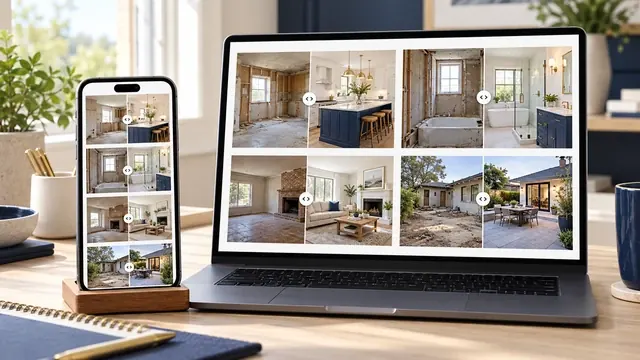
- Photos of your work, ideally before and after, in the highest quality you have.
- Links to your Google reviews or other review profiles.
- Licenses, insurance, certifications or awards you actually hold.
- A photo of you or your team.
Your Business Details
These details must match your Google Business Profile and directory listings exactly.
- Your phone number and email for customers, exactly as they should appear.
- Your business hours and the languages you serve customers in.
- Your address, or a note that you serve customers at their location only.
- Your social media profile links.
Your Access and Accounts
Access lets the designer connect your site without waiting days for logins.
- Your domain login, or the name of the company where you bought it.
- Your hosting account, if you already have one in your name.
- Access to Google Business Profile and Google Search Console, if they exist.
- If you're replacing a site: the current website login and any agency contact.
What If You Don't Have Everything?
Missing items rarely stop a project; they change how the designer works around them.
| Missing item | Does it delay your launch? | What we do instead |
|---|---|---|
| Logo in high quality | Rarely | We use the best version you have and note a vector logo for later |
| Photos of your work | No | We use professional stock images and send you a phone photo guide |
| Service descriptions | Yes, the most | We interview you on the call and write from your answers |
| Reviews | No | We leave space and show you how to ask customers for reviews |
| Domain access | Yes, at launch | We guide you through finding or transferring it |
| Brand colors | No | We propose a palette based on your logo and the sites you like |
The Free Website Checklist, in One List
Copy this list into a note on your phone and check items off as you find them.
- Logo file
- Brand colors or example sites
- List of services in order of importance
- Service area
- How you price
- Photos of your work
- Review links
- Licenses, insurance and awards
- Team photo
- Phone, email, hours and languages
- Social media links
- Domain, hosting and Google account access
Two Questions to Settle Before You Hire
Before you send anything, make sure you know what kind of site you're buying and who will own it.
If you're still deciding between a builder and a designer, read Wix vs custom website. And before you hand over logins, ask the questions in do I own my website, so your domain and hosting stay in your name.
Key Terms in Plain English
These are the terms used in this guide, each explained in one sentence, the same way we explain them on our calls.
- WebP
- A modern image format that keeps photos sharp at a fraction of the file size, so pages load faster on phones.
- Before-and-after photos
- Two photos of the same spot, taken from the same angle before and after a job. They are the clearest proof of quality a service business can show.
- Call to action
- The button or link that tells a visitor what to do next, such as calling you or requesting a quote.
- Keyword research
- Finding the exact words your customers type into Google when they look for your service, so your pages use those same words.
Frequently Asked Questions
These are the questions owners ask us most about this topic.
What do I need to give a web designer?
Your logo, a list of services, your service area, photos of your work, review links, contact details and access to your domain. The checklist above lists everything.
Do I need to write the text for my website?
It depends on the designer. Some expect you to write it; others write it from an interview. Ask before you sign, because it changes both price and timeline.
What if I don't have a logo?
A designer can start with your business name in a clean font. A logo can be added later without rebuilding the site.
Is it safe to share my domain login?
Share access with someone you trust, and change the password after launch. Better yet, add the designer as a user so you keep the main account.
How long does it take to gather everything?
Most owners gather the essentials in a day or two. Photos take longest; start with what you have and add more after launch.