
Summary
- Six causes explain almost every case of a business missing from Google.
- You can test all six yourself in about 30 minutes with free tools.
- Fix what blocks Google first, then service pages, speed and proof.
- Ads don't improve regular rankings; the fixes in this guide do.
The Short Answer
Most businesses don't show up on Google for one of six reasons: the site isn't indexed, something blocks Google, there's no page for the service, the site is slow on phones, the Google profile is missing or inconsistent, or competitors simply have more proof.
The good news: you can check all six yourself in about 30 minutes, with free tools and no technical skills.
The 6 Common Causes and How to Test Each One
Go through the causes in order, because the first ones are the quickest to check and the easiest to fix.
Cause 1: Google Hasn't Found or Indexed Your Site Yet
If Google hasn't indexed your site, it can't show it, no matter how good it is.
New sites, and sites no other website links to, can take days or weeks to be discovered. Google says it finds most new pages through links from pages it already knows (Google Search Central (opens in a new tab)).
Self-test: Search site:yourdomain.com on Google. If nothing appears, your site isn't indexed yet.
Cause 2: Something Is Blocking Google
A single setting can tell Google to stay away from your whole site.
Builders and developers sometimes leave a "don't index" setting on after building a site, or a robots.txt file blocks important pages by mistake.
Self-test: In Google Search Console, use the URL inspection tool on your home page. It tells you if the page is blocked or excluded.
Cause 3: You Don't Have a Page for That Service
Google ranks pages, not businesses, so a service without its own page rarely shows up for searches about it.
If your home page lists ten services in one paragraph, Google has no strong page to show for any of them.
Self-test: Search your main service plus your city. If your site appears only for your business name, this is likely the cause.
Cause 4: Your Site Is Slow or Hard to Use on a Phone
A slow, clumsy site on mobile gives Google and visitors a reason to prefer your competitors.
Google looks at page experience, and visitors who leave quickly send the same signal.
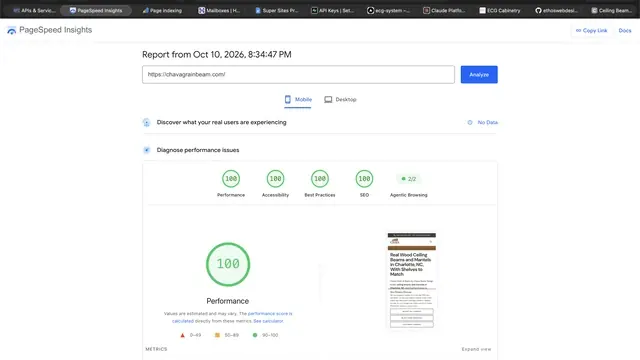
Self-test: Run your home page through Google PageSpeed Insights on the mobile setting. A score under 50 is a red flag.
Cause 5: Your Google Business Profile Is Missing or Inconsistent
For local searches, your Google Business Profile often matters as much as your website.
A missing profile, the wrong categories, or a phone number that doesn't match your site make you harder to trust.
Self-test: Search your business name on Google Maps and compare every detail with your website.
Cause 6: Your Competitors Have More Proof
Sometimes everything works, but competitors simply have more reviews, more pages and more mentions.
This is the slowest cause to fix, because proof builds over time, but it's also the one you control through good work.
Self-test: Compare your number of Google reviews with the three businesses that show up first for your service.
The 30-Minute Self-Test, Summarized
Here are all six causes with the time to check and how hard each is to fix.
| Cause | Time to check | How hard to fix |
|---|---|---|
| Not indexed yet | 1 minute | Easy: submit your sitemap and link your site from your profiles |
| Something blocks Google | 5 minutes | Easy once found, but needs someone technical |
| No page for the service | 2 minutes | Medium: needs new, well-written pages |
| Slow or hard to use on phones | 2 minutes | Medium to hard: may need a rebuild |
| Google profile missing or inconsistent | 10 minutes | Easy: you can fix it yourself |
| Competitors have more proof | 10 minutes | Slow: reviews and mentions build over months |
What to Fix First
Fix what blocks Google first, then what helps it understand you, then what builds proof.
- Make sure nothing blocks Google and submit your sitemap in Search Console.
- Complete your Google Business Profile and make your details identical everywhere.
- Give each main service its own page.
- Fix speed, or rebuild if the site is too slow to fix.
- Ask every happy customer for a review.
Go Deeper
If speed was one of your causes, read how fast should a website be for the scores that matter. And if you're wondering whether to pay for SEO every month, read one-time SEO first.
Key Terms in Plain English
These are the terms used in this guide, each explained in one sentence, the same way we explain them on our calls.
- Google Business Profile
- Google's free business listing that appears on Google Maps and in local results, with your hours, photos, services and reviews.
- Google Search Console
- Google's free tool that shows which searches bring people to your website and alerts you to problems Google finds on it.
- Local SEO
- The work of showing up when people near you search for your service, both in Google's map results and in the regular results.
- NAP consistency
- Using exactly the same business name, service area and phone number on your website, your Google Business Profile and every directory.
Frequently Asked Questions
These are the questions owners ask us most about this topic.
How do I check if Google has indexed my website?
Search site:yourdomain.com on Google. If your pages appear, they're indexed. Google Search Console shows the details.
Why does my business show on Google Maps but not in search results?
Your Google Business Profile is working, but your website may lack service pages or be slow. They're ranked separately.
How long after fixing these issues will I show up?
Indexing fixes can show results in days or weeks. Content and proof fixes usually take weeks to months.
Can paying for Google Ads help my regular rankings?
No. Ads appear in ad spaces and stop when you stop paying; they don't change your regular rankings.
Do I need a new website to show up on Google?
Not always. If your site is fast and only missing pages or settings, it can be fixed. If it's slow or built on a limited platform, rebuilding often costs less.